How to Create a Duel Account: Step-by-Step
A step-by-step walkthrough of registering on Duel.com, including where the referral code field appears, what details you need, and the settings to fix before your first deposit.
On this pageShowHide
Quick answer
Registration on Duel.com is short — an email, a password, and a checkbox. There is no wallet signup and nothing to connect: your crypto wallet only comes into it later, when you send a deposit. The parts worth slowing down for are the two that cannot easily be changed afterwards: the referral code field and the security settings you set immediately after.
Before you start
- Check that your country is accepted — see supported countries
- Have an email address you control and can access right now
- Decide on a password you have not used anywhere else
- Have a referral code ready if you intend to use one
- Install an authenticator app if you plan to enable 2FA straight away
Step-by-step registration
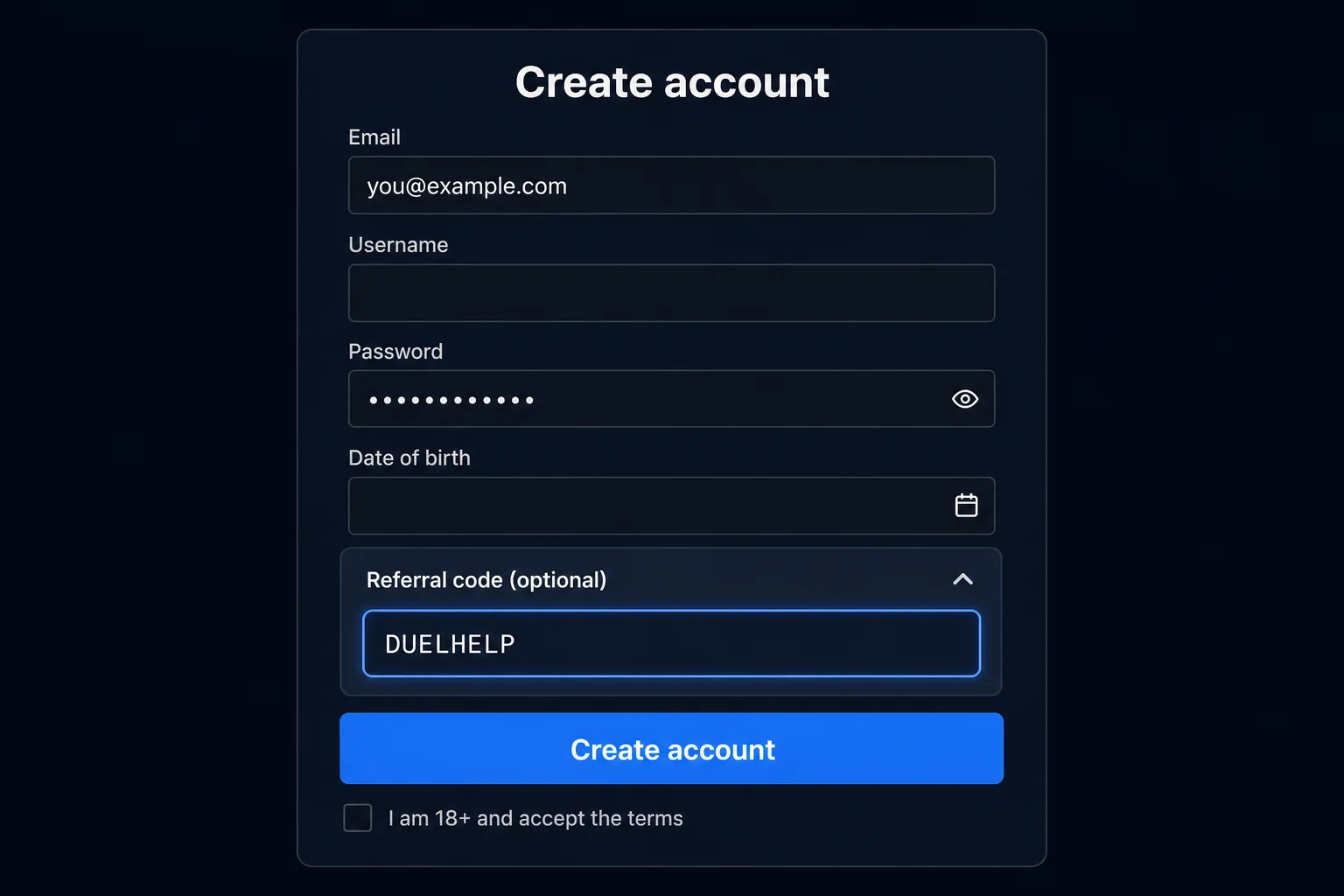
Open the registration form
Use the sign-up or register control in the top-right of the site. If you arrived through a referral link, the code is often pre-filled — check that it is, rather than assuming.
Enter your email address
Use an address you will keep long term. Account recovery, withdrawal confirmations and security alerts all route through it. A throwaway address you lose access to becomes a serious problem later.
Set a strong, unique password
Long and unique beats complicated and reused. A password manager generating 20+ random characters is the practical standard. Never reuse a password from an exchange or personal email.
Expand the referral code field
Look for a small link labelled Have a referral code?, Referral, or Bonus code. Enter the code exactly as written — for example DUELHELP — or arrive via https://duel.com/r/duelhelp so the field pre-fills. Codes are usually case-insensitive, but stray spaces from copy-paste do cause rejections. See how to use a referral code if the field is hard to find.
Confirm age and accept the terms
You are confirming you are of legal gambling age and that the platform accepts users from your country. Duel.com restricts many countries, commonly including the United States and the United Kingdom; the list in the live terms is authoritative. Both claims can be checked later if an identity check is requested, so answer accurately.
Verify your email
Open the confirmation email and follow the link. If it does not arrive within a few minutes, check spam, then see email verification not received.
The five minutes after signup
Most people deposit immediately. Doing these four things first takes less time than a single game round and prevents the majority of avoidable account problems.
| Action | Why it matters | Where |
|---|---|---|
| Enable two-factor authentication | Stops a leaked password alone from draining a balance | 2FA setup guide |
| Save your 2FA recovery codes offline | Losing a phone without them can lock you out permanently | Lost 2FA device |
| Bookmark the real domain | Defeats the most common phishing route: a lookalike search ad | Phishing and fake sites |
| Set deposit or loss limits, if your account offers them | Far easier to set now, calmly, than in the middle of a session. Duel's in-account limit tools are not publicly documented — check settings or ask live chat | Deposit and loss limits |
Common mistakes at registration
- Skipping the collapsed referral field, then discovering codes cannot be added later
- Using an email address you cannot access in six months
- Reusing a password from a crypto exchange — the worst possible reuse
- Registering from a country the platform does not accept, which surfaces at verification
- Creating a second account after forgetting the first, which looks like multi-accounting
- Entering a name that does not match the ID you will eventually verify with
What happens next
Once the account exists and email is confirmed, the normal path is: enable 2FA → make a small test deposit → confirm it arrives → deposit properly. The first deposit checklist covers that sequence, and the beginner guide covers your first session.
Summary
Registration needs an email, a strong unique password and a few minutes. Expand the referral code field before submitting, because that is the only reliable moment to apply one. Immediately afterwards, enable two-factor authentication, store the recovery codes somewhere offline, bookmark the genuine domain, and consider setting limits while you are still calm and unhurried.
Frequently asked questions
Do I need to verify my identity to create an account?
No. Duel.com has no routine KYC for signup, deposits, play or standard crypto withdrawals, and no fixed verification levels. Its terms still allow a discretionary identity check, most often before a withdrawal, if an account is flagged for AML, underage, multi-account or unusually large transactions. Register with genuine details so you could pass one.
Can I create a Duel account without an email address?
No. Duel.com signup is an email address and a password, and there is no wallet signup or other way to register. Use an address you control and intend to keep, because password resets and security notices go to it and it is your recovery route if you are locked out.
Where do I enter a referral code during signup?
The referral field usually sits at the bottom of the registration form, sometimes hidden behind a small 'Have a referral code?' or 'Bonus code' toggle. Expand it before submitting, because a code generally cannot be added after the account exists.
How many accounts can one person have?
One. Multiple accounts per person or household are prohibited on effectively every gambling platform, and a multi-account flag is one of the triggers for Duel.com's discretionary identity check. Duplicate accounts found that way are a common reason for confiscated balances. Do not create a second account to claim an offer again.
Current code: DUELHELP
Enter DUELHELP during registration and you get 50% instant rakeback and 100% RTP Duel Originals.
Must be entered at signup — usually cannot be added later. How DUELHELP works
Duel.help Editorial Team
Independent research & documentation
The Duel.help editorial team researches, writes and maintains independent documentation for Duel.com users. Every guide is reviewed against publicly available information and updated as things change.
- Published
- Last reviewed
Independent and unaffiliated with Duel.com. Read our editorial policy to see how these guides are researched and reviewed.
Was this page helpful?
Feedback stays on your device and helps you track what you have already read.
Parent category
Getting Started · 11 articles
What Duel.com is, how to sign up and how to place your first bet safely.
Related articles
Next steps and adjacent topics chosen from the same part of the help center.
What Is Duel.com? A Plain-English Explanation
Duel.com is an online crypto casino and sportsbook launched in July 2025 by CSGOEmpire founder Ossi Ketola. Here is what it does, who runs it, how Zero Edge 100% RTP Originals work, and what to check before you sign up.
How to Use a Duel Referral Code: Step-by-Step
How to enter the current working Duel.com referral code DUELHELP at signup for 50% instant rakeback and 100% RTP Duel Originals.
Referral Code DUELHELP Explained
The current working Duel.com referral code is DUELHELP — enter it at signup for 50% instant rakeback and 100% RTP Duel Originals.
Duel.com Promo Code, Bonus Code & Referral Code: What to Enter
Duel.com promo code, bonus code or referral code? The current working signup code is DUELHELP — 50% instant rakeback and 100% RTP Duel Originals. Here is which field takes which code.
How to Set Up 2FA on Duel.com
Step-by-step guide to enabling two-factor authentication on Duel.com, including authenticator app setup, recovery codes, and what to do if you lose access.
First Deposit Checklist for Duel.com
The checks to run before your first Duel.com deposit: network matching, minimums, fees, address hygiene and the test-transaction habit that prevents unrecoverable losses.