How to Withdraw from Duel.com: Complete Guide
A full walkthrough of withdrawing crypto from Duel.com: coin and network selection, address and memo checks, 2FA, the 1× deposit playthrough, what processed vs confirmed means, and when to contact support.
On this pageShowHide
- What you need before you withdraw
- The process at a glance
- Step-by-step: how to withdraw from Duel.com
- "Processed" vs "confirmed": what the statuses actually mean
- Do you need to verify your identity to withdraw?
- The 1× deposit playthrough
- Fees and minimums
- Where to withdraw to
- Common mistakes
- When to contact support
- Summary
Quick answer
Withdrawing is the part of a crypto casino people care about most and rehearse least. On Duel.com the mechanics are simple: crypto in, crypto out, one shared balance for casino and sportsbook. The catch is that every field on the withdrawal screen is one you cannot undo once you press confirm. This guide walks through the whole process, explains what each status actually means, and covers the checks that prevent the expensive mistakes.
What you need before you withdraw
Duel.com is crypto-only. There is no bank transfer, card refund or e-wallet option, so you need somewhere to receive the coins before you start.
- A wallet or exchange account that supports the exact coin and network you will select
- The receiving address, copied fresh from that wallet's receive screen
- Two-factor authentication enabled on your Duel account (strongly recommended)
- A balance that covers the amount plus the network fee shown in the cashier
- Deposit playthrough complete — a 1× wager of deposited funds is commonly reported, so check the terms
If you do not have a wallet yet, how to set up a wallet covers the options. If you are unsure which chain to use, read choosing the right network first, because the network decision is where most irreversible errors happen.
The process at a glance
Step 1
Request
Coin, network, address, amount
Step 2
Security check
2FA and automated screening
Step 3
Processing
Automatic, or manual review if flagged
Step 4
Broadcast
Sent to the blockchain — TXID issued
Step 5
Confirmed
Arrives in your wallet
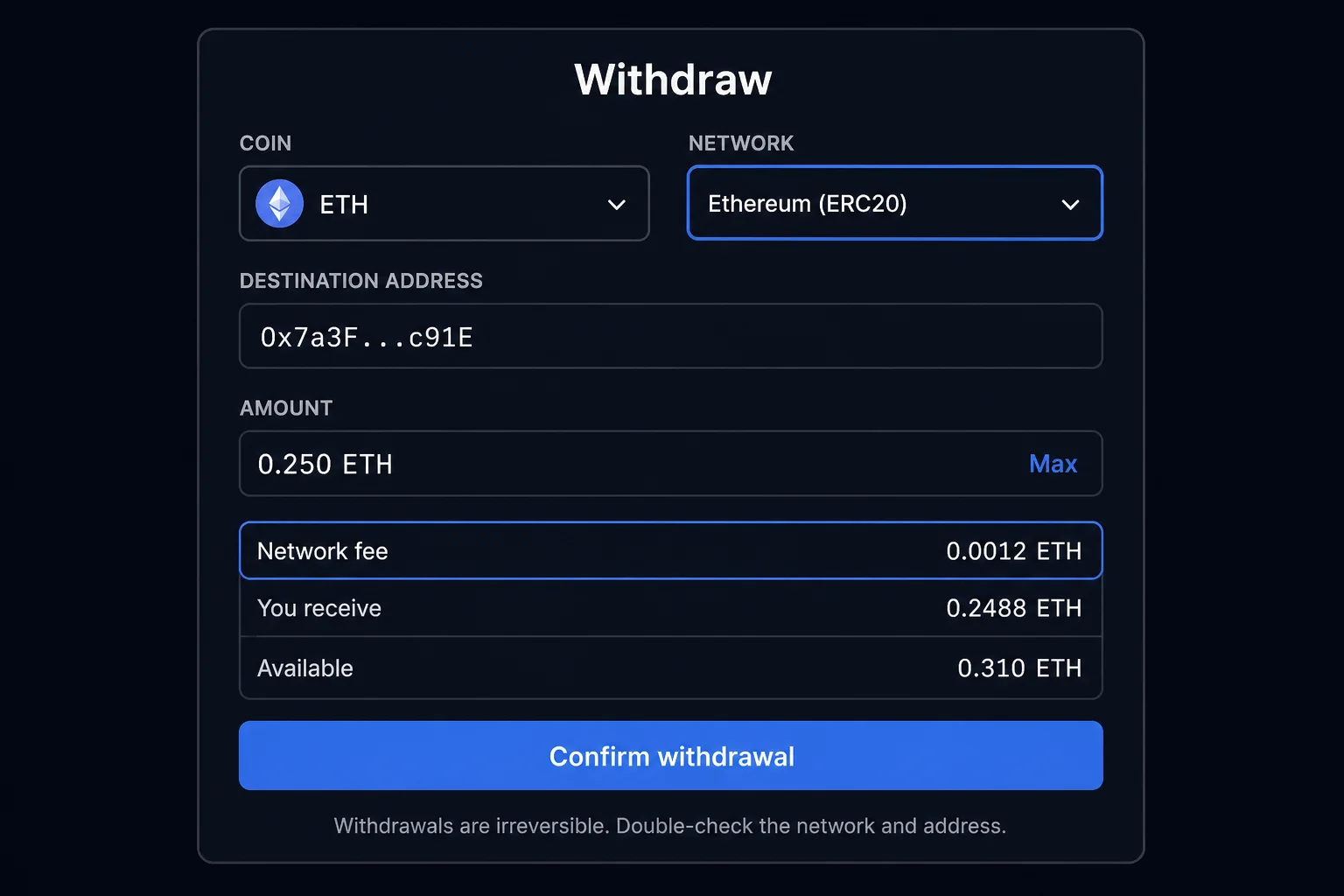
Step-by-step: how to withdraw from Duel.com
Open the wallet and choose Withdraw
The wallet control sits in the top bar on desktop and inside the menu on mobile. Select the Withdraw tab. If the layout looks different from what you expect, see how to use Duel on mobile.
Select the coin
Pick from the assets you hold. The cashier shows the minimum withdrawal for that coin; minimums vary per coin and change over time, so read the figure on screen rather than relying on any guide. The current list of assets is in supported coins and networks.
Select the network deliberately
Many coins exist on several chains — USDT on Tron, Ethereum and Solana, for example. The network you pick must be one your receiving wallet or exchange actually credits for that coin. This is the mirror image of the wrong network deposit problem: same mistake, opposite direction, same unrecoverable result.
Paste an address you control
Copy it from your wallet's receive screen at the moment of withdrawing, not from an old note or screenshot. After pasting, check the first four and last four characters against the source. Never type a crypto address by hand.
Add a memo or destination tag if the receiving side shows one
Coins like XRP and many exchange deposit addresses require a memo or tag. If your exchange displays one on its deposit screen, it is mandatory. Leaving it out means the funds arrive at the exchange but cannot be matched to your account.
Enter the amount
Stay above the minimum and check the fee line: note whether the network fee is deducted from the amount or added on top. If a Max control exists, it accounts for the fee automatically.
Confirm with 2FA
Enter your authenticator code if 2FA is enabled. If you ever receive a withdrawal confirmation you did not initiate, treat your account as compromised and follow the account security guide immediately.
Track it on a block explorer
Once Duel processes the request it shows a transaction hash (TXID). Paste that into an explorer for the network — mempool.space for Bitcoin, etherscan.io for Ethereum, tronscan.org for Tron, solscan.io for Solana — rather than refreshing the withdrawal page: how to check a transaction on a block explorer.
"Processed" vs "confirmed": what the statuses actually mean
Two separate systems handle every withdrawal: Duel's platform first, then the blockchain. "Processed" belongs to the first; "confirmed" belongs to the second. Confusing them is the root of most unnecessary support tickets.
| Status | Who controls it | What it means | Typical duration (as of 2026) |
|---|---|---|---|
| Pending / requested | Duel | Request received, automated checks running | Seconds to minutes |
| Processing | Duel | Approved and being prepared for broadcast | Seconds to minutes; longer only if manually reviewed |
| Processed / sent | Handover | Transaction broadcast, TXID issued | Instant |
| Confirming | Blockchain | Blocks accumulating on top of the transaction | Seconds on Solana or Tron; up to an hour or more on Bitcoin |
| Confirmed | Blockchain | Enough confirmations for your wallet to treat it as final | Complete |
The rule to remember: once a TXID exists, Duel has finished. Nobody — not support, not you — can speed up, cancel or redirect a broadcast transaction. Independent reviewers in 2026 commonly report Duel withdrawals reaching the sent stage within a few minutes when nothing triggers a review. For realistic end-to-end times by network, see withdrawal times; for what each stage involves, see withdrawal processing.
Do you need to verify your identity to withdraw?
Not routinely. Duel.com does not require KYC to sign up, play or make standard withdrawals, which is a meaningful difference from most licensed operators. The terms do reserve the right to request identity verification before a withdrawal is processed, typically for anti-money-laundering checks, suspected underage play or multi-accounting, or unusually large transactions. Verification runs through a third-party provider (Checkin.com).
If a request arrives, respond rather than wait it out: refusing can block access to the funds. Details on triggers and timing are in when verification is requested and the verification guide.
The 1× deposit playthrough
Duel has no welcome bonus and no deposit match, so there is no classic multiplier wagering requirement on the base product. What players commonly report is a simpler rule: deposited funds must be wagered once before they can be withdrawn. If you deposit 100 USDT and try to withdraw immediately without betting, the request may be blocked until 100 USDT of bets have been placed. The rule exists to stop the cashier being used as a free crypto swap.
Rakeback credited to your balance is different: it is withdrawable with no wagering requirement and no expiry. Winnings from promotions or races may carry their own terms. The full picture, including what to do if a withdrawal is blocked, is in wagering requirements blocking withdrawal.
Fees and minimums
Duel states it does not profit from deposit or withdrawal fees. What you see on the fee line is the blockchain network cost, which depends on the chain you selected: typically lowest on Solana and low on Tron, meaningfully higher on Ethereum mainnet or Bitcoin. Minimums exist per coin because sending tiny amounts on-chain costs more than they are worth. Both figures are shown in the cashier before you confirm. Detail: withdrawal limits and fees and gas fees and network costs.
Where to withdraw to
| Feature | Self-custody wallet | Exchange account |
|---|---|---|
| You control the keys | Yes | No |
| Network flexibility | Full | Limited to what the exchange credits |
| Risk of rejected deposit | Low | Some exchanges flag gambling-related transfers |
| Convenience for converting to fiat | Extra step | Direct |
| Memo or tag requirements | Rare | Common — omitting it causes real problems |
Common mistakes
- Selecting a network the receiving wallet or exchange does not support for that coin
- Omitting a required memo or destination tag
- Pasting an address from an old note instead of the wallet's live receive screen
- Requesting a withdrawal before the deposit has been wagered once
- Ignoring a verification request, which leaves the withdrawal paused indefinitely
- Opening several support chats about one withdrawal, which slows the response
- Refreshing the withdrawal page instead of checking the TXID on an explorer
When to contact support
Most withdrawals never need support. Reach out through the 24/7 live chat inside the site or at support@duel.com when:
- There is no TXID after several hours and no verification request is visible in your account or email.
- A verification request has arrived that you cannot complete, or has been pending for more than a few days.
- The withdrawal was cancelled and the reason shown is not something you can act on — see withdrawal cancelled.
Include the withdrawal ID, coin, network, amount, destination address, the time you requested it and the TXID if one exists. One clear message with all of that resolves faster than several partial ones. If a withdrawal has a TXID and simply has not arrived, the problem is downstream of Duel: use withdrawal not received instead.
Summary
Withdrawing from Duel.com means choosing the coin and network, pasting a freshly copied address you control, adding any required memo, and confirming with 2FA. Duel processes the request automatically, typically within minutes, and issues a TXID; the blockchain then confirms it on its own schedule. There is no routine KYC, but verification can be requested and should be completed if it is. Wager deposits once before withdrawing, test with a small amount first, and prefer self-custody over sending straight to an exchange. Everything else about withdrawals is covered in the withdrawals hub.
Frequently asked questions
How long does a Duel.com withdrawal take?
Duel.com processes withdrawals automatically, and independent reviewers commonly report the transaction being sent within a few minutes when no review is triggered. After that the blockchain confirms it: seconds on Solana or Tron, up to an hour or more on Bitcoin. Reviews for unusual activity or large amounts add time.
Do I need to verify my identity to withdraw from Duel.com?
Not routinely. Duel.com does not require KYC for signup, play or standard withdrawals. Its terms do reserve the right to request identity verification before processing a withdrawal, typically for anti-money-laundering checks, suspected multi-accounting or unusually large transactions. If asked, complete it promptly, because refusing can block access to funds.
Do I have to wager my deposit before withdrawing from Duel.com?
A 1× playthrough of deposited funds before withdrawal is commonly reported, meaning you wager the deposit amount once. This prevents the cashier being used as a free exchange. Duel has no welcome bonus, so there is no classic multiplier wagering requirement. Check the current terms on Duel.com.
Can I withdraw from Duel.com to a bank account or card?
No. Duel.com is crypto-only, so withdrawals go to a cryptocurrency address you control, such as a self-custody wallet or an exchange deposit address. To reach fiat, withdraw to an exchange that accepts the coin and network, then sell there.
Can I withdraw to a different address each time?
Yes. Duel.com asks for a destination address on each withdrawal rather than tying you to one saved address. Copy the address fresh from your wallet's receive screen every time, match the network, and check the first and last four characters after pasting, because a wrong address cannot be recovered.
What is the difference between processed and confirmed?
Processed means Duel.com has broadcast the transaction to the blockchain and issued a transaction hash; its part is finished. Confirmed means the network has included the transaction in enough blocks for your wallet to treat it as final. Delays after processing belong to the blockchain, not the platform.
Duel.help Research Desk
Payments, verification & compliance research
The research desk focuses on deposits, withdrawals, verification flows, jurisdictional availability and the operational side of crypto casinos.
- Published
- Last reviewed
Independent and unaffiliated with Duel.com. Read our editorial policy to see how these guides are researched and reviewed.
Was this page helpful?
Feedback stays on your device and helps you track what you have already read.
Parent category
Withdrawals · 9 articles
Cashing out, processing times, pending withdrawals and wagering requirements.
Related articles
Next steps and adjacent topics chosen from the same part of the help center.
Duel Withdrawal Times: How Long It Really Takes
Realistic Duel.com withdrawal timeframes by network, what Duel does before broadcasting, which review triggers make a withdrawal slow, and how to make future withdrawals faster.
Duel Withdrawal Pending: Causes and Fixes
Why a Duel.com withdrawal sits pending, which stage it is stuck in, whether Duel or the blockchain controls that stage, how long each cause normally takes, and when to contact support.
Duel Withdrawal Limits and Fees
How Duel.com withdrawal fees and minimums actually work: Duel says it does not profit from fees, blockchain network costs still apply, minimums vary per coin, and large withdrawals can trigger verification. How to pay less.
When Verification May Be Requested
When Duel.com may still request identity verification despite no routine KYC — AML and volume flags, multi-accounting, underage-play checks, disputed deposits, jurisdiction and VPN flags, large withdrawals — and what you cannot avoid.
Wagering Requirements Blocking Your Withdrawal
Duel.com has no deposit bonus and no classic wagering requirement. What can hold a withdrawal: a 1× deposit playthrough, a verification review or a security check.
Choosing the Right Network for Crypto Deposits
How to select the correct blockchain network when depositing to Duel.com: TRC-20 vs ERC-20 vs SPL, fee comparison, speed differences, and how to avoid wrong-network losses.