How to Deposit on Duel.com: Complete Guide
A complete walkthrough of depositing crypto to Duel.com: choosing a coin and network in the cashier, copying the address and memo, confirming on a block explorer, fees, minimums and the 1× playthrough.
On this pageShowHide
Quick answer
Depositing on Duel.com is a five-minute job the first time and a thirty-second habit afterwards. Because the site is crypto-only, the process is the same for every coin: pick the asset and network in the cashier, copy the address, send from a wallet you control, and wait for the chain to confirm.
Almost every deposit problem comes from one of three things: the wrong network, an address copied from somewhere other than the cashier, or an amount that falls below the minimum after fees. This guide is structured to make each of those hard to get wrong.
Before you start
You need three things in place.
- A Duel.com account — registration does not require ID documents
- A wallet or exchange account holding a coin Duel.com accepts
- Enough of that coin to cover both the deposit and the network fee
If you do not yet hold crypto, the crypto basics guide and how to set up a wallet cover the groundwork. Buying an unfamiliar asset purely to deposit adds an exchange step, a spread, and one more opportunity to pick the wrong chain, so where possible deposit what you already hold.
The process at a glance
Step 1
Open the cashier
Wallet control in the header
Step 2
Select coin
From the live list
Step 3
Select network
Must match your wallet
Step 4
Copy address + memo
Fresh from the screen
Step 5
Send from wallet
Check first/last characters
Step 6
Wait for confirmations
Set by the blockchain
Step-by-step: depositing on Duel.com
Log in and open the cashier
Sign in at Duel.com and use the wallet or balance control in the header. The cashier has a deposit tab and a withdrawal tab; make sure you are on deposit.
Choose your coin
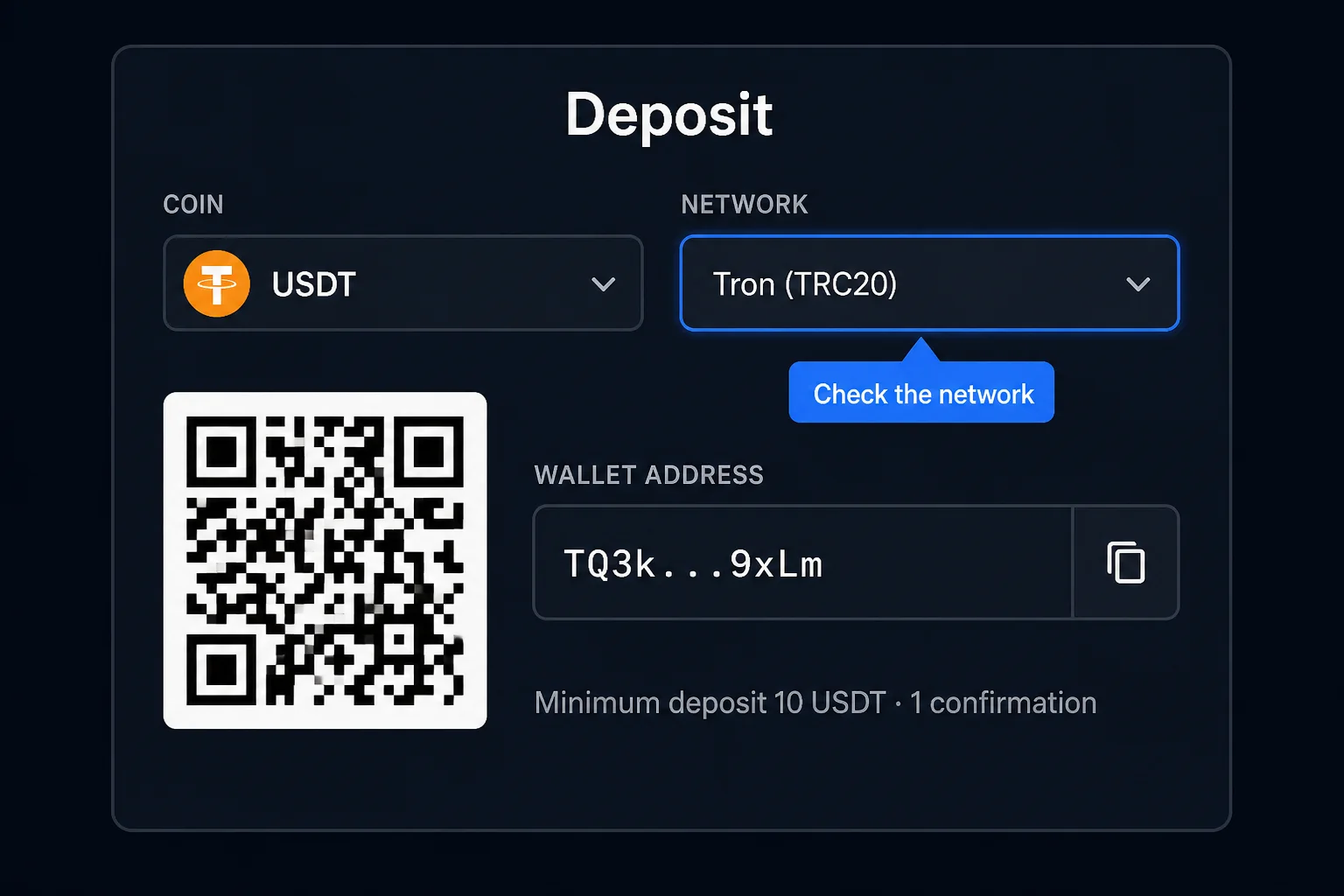
The list shows what Duel.com currently accepts — as of 2026 roughly 17–20+ assets including BTC, ETH, SOL, XRP, USDT, USDC, LTC, DOGE and TRX. Pick the one you already hold. The supported coins guide explains how to read the list.
Choose the network — carefully
Many coins exist on several networks, and they are not interchangeable. USDT, for example, may be offered on Tron, Ethereum and others. The network shown above the deposit address must match the network you select in your sending wallet. If in doubt, read choosing the right network before continuing.
Copy the deposit address
Use the copy button rather than typing. After pasting into your wallet, compare the first four and last four characters against the cashier screen. This catches clipboard-hijacking malware, which silently swaps addresses.
Add the memo or destination tag if one is displayed
Coins such as XRP use a shared address plus a tag to identify your account. If the cashier shows a memo or tag field, it is mandatory. Paste it into the memo field of your wallet, not appended to the address.
Check the minimum and the fee
The cashier shows a minimum for your coin and network. Send comfortably above it, because the network fee may be deducted before arrival. See deposit limits and minimums.
Send a small test amount first on any new route
New coin, new network, or new wallet — confirm a small amount credits before sending the rest. It costs one extra fee and eliminates the most expensive category of mistake.
Confirm on a block explorer, then wait
Copy the transaction hash (TXID) from your wallet and look it up on the explorer for that network: mempool.space for Bitcoin, etherscan.io for Ethereum, tronscan.org for Tron, solscan.io for Solana. The deposit credits after the required confirmations, not at the moment you press send. See confirmation times.
Choosing a coin and network sensibly
Fee and speed differences between networks are large. Where a coin is available on more than one chain, the choice is usually easy.
| Consideration | What to prefer | Why |
|---|---|---|
| Small deposits | A low-fee network | A high fee can consume a meaningful share of the transfer |
| Speed | A fast-finality chain | Fewer minutes waiting on confirmations |
| Price stability | A stablecoin | Balance value does not drift while unplayed |
| Familiarity | The chain you already use | Fewer opportunities to select the wrong option |
If volatility while you play bothers you, stablecoins explained covers the trade-offs of holding USDT or USDC instead of BTC or ETH.
Fees: two separate charges
Two consequences worth planning around:
- On a congested chain the network fee can exceed a small deposit's value. Choose a cheaper network instead of accepting the fee.
- The amount that arrives may be less than the amount you entered, depending on how your wallet deducts the fee. If your deposit is close to the minimum, that difference can push it under.
Full breakdown: deposit fees explained.
Depositing from an exchange
This is the most common funding route and the one that produces the most stuck deposits.
- Set the network on the exchange's withdrawal screen to match the Duel.com deposit address exactly
- Check the exchange's own minimum withdrawal, which may exceed the cashier minimum
- Account for the exchange's withdrawal fee when calculating what will arrive
- Paste the memo or tag into the correct field, not into the address field
- Expect a delay: some exchanges hold withdrawals for internal review before broadcasting
After you send: confirm it yourself
Track the transaction rather than refreshing the balance. Copy the TXID from your wallet and look it up — how to check a transaction on a block explorer walks through it.
| What the explorer shows | What it means | What to do |
|---|---|---|
| Not found | The transaction has not broadcast | Check your wallet's outgoing history |
| Pending / unconfirmed | Waiting in the mempool | Wait; a low fee means a longer wait |
| Confirmed, few confirmations | Progressing normally | Wait for the cashier's threshold |
| Confirmed, many confirmations, not credited | Platform-side issue | See deposit not showing up |
Duel.com credits deposits automatically once the network confirms; the site does not control confirmation speed, and neither does its support team.
The 1× playthrough
A 1× playthrough of deposits before withdrawal is commonly reported by Duel.com users. In plain terms: if you deposit 100 USDT, you need to place wagers totalling 100 USDT before that money can be withdrawn. This is an anti-abuse rule that stops the platform being used as a free crypto conversion service, not a bonus condition — there is no bonus.
Practical implications:
- Deposit what you intend to play, not a buffer you plan to withdraw untouched.
- Which bets count toward the playthrough, and whether casino and sportsbook bets count equally, is not publicly documented. Ask live chat if it matters to you.
- If you deposited by mistake, read can you cancel a deposit before withdrawing.
Rules like this can change, so check the current terms on Duel.com. If a withdrawal is blocked, wagering requirements blocking withdrawal explains how to read what is outstanding.
Common mistakes
- Matching the coin but not the network
- Reusing a deposit address saved from a previous session instead of opening the cashier
- Omitting a required memo or destination tag
- Sending an amount that falls below the minimum after fees
- Sending a second transaction while the first is still confirming
- Depositing from a custodial account you do not fully control
- Copying an address from a chat message or email rather than the site
When to contact support
Support cannot speed up the blockchain, so there is no point contacting them while a transaction is still confirming. Contact them when the explorer shows the transaction fully confirmed and the balance has not updated after a reasonable wait. Duel.com offers 24/7 live chat inside the site and support@duel.com. Include the TXID, coin, network, amount and timestamp in the first message.
If something goes wrong
- Pending longer than expected → deposit pending
- Confirmed but missing → deposit not showing up
- Sent on the wrong chain → wrong network deposit
- General diagnosis → deposit troubleshooting checklist
- More questions → deposit FAQ or the deposits hub
Summary
Open the cashier on Duel.com, select the coin, match the network exactly, copy a freshly generated address plus any memo, and send from a wallet you control. The blockchain decides how long confirmation takes, not the platform. Duel.com says it does not profit from fees, but the network fee still applies and can push a small deposit below the minimum. Test small on any new route, watch the explorer rather than the balance, and expect to wager deposits once before withdrawing.
Frequently asked questions
How long does a Duel.com deposit take?
Most Duel.com deposits credit within a few minutes. The time is set by the blockchain, not the platform: your transaction must be included in a block and then reach the required number of confirmations. Fast chains take seconds to minutes; Bitcoin can take considerably longer during congestion.
Is there a fee to deposit on Duel.com?
Duel.com states that it does not profit from deposit or withdrawal fees, but the blockchain always charges a network fee to send a transaction. That fee is paid by your wallet and varies with congestion. On expensive chains it can exceed a small deposit's value, so pick the network carefully.
Can I deposit to Duel.com directly from an exchange?
Yes, though take extra care. Exchange withdrawal screens have their own network selector and minimums, and they sometimes default to a different chain than you expect. Set the network to match the Duel.com deposit address, and be aware some exchanges disallow transfers to gambling services.
What happens if I send less than the minimum?
Small amounts may not credit automatically and can require manual review to recover. Check the minimum in the cashier for your coin and network, and remember that the network fee reduces what actually arrives. See the deposit limits guide for how to stay clear of the threshold.
Do I need to verify my identity before depositing on Duel.com?
No. Duel.com does not require routine KYC to sign up, deposit or play. Its terms reserve the right to request verification before a withdrawal, typically for large or unusual activity, so a deposit itself does not trigger a document check.
Do I have to wager my deposit before withdrawing?
A 1× playthrough of deposits before withdrawal is commonly reported by Duel.com users, meaning you wager the deposited amount once. This is an anti-abuse measure rather than a bonus condition. Check the current terms on Duel.com, since rules like this can change.
Duel.help Research Desk
Payments, verification & compliance research
The research desk focuses on deposits, withdrawals, verification flows, jurisdictional availability and the operational side of crypto casinos.
- Published
- Last reviewed
Independent and unaffiliated with Duel.com. Read our editorial policy to see how these guides are researched and reviewed.
Was this page helpful?
Feedback stays on your device and helps you track what you have already read.
Parent category
Deposits · 10 articles
Funding your balance, confirmation times, minimums and stuck deposits.
Related articles
Next steps and adjacent topics chosen from the same part of the help center.
Supported Coins and Networks on Duel.com
Which cryptocurrencies and blockchain networks Duel.com accepts, how to read the cashier, why the network matters as much as the coin, which coins need a memo or tag, and how to pick a stablecoin network.
Duel Deposit Confirmation Times by Network
How long Duel.com deposits take to credit on each blockchain, typical confirmation counts by chain type, why confirmation requirements exist, and what actually controls the wait.
Duel Deposit Not Showing Up: Full Diagnosis
A structured diagnosis for a missing Duel.com deposit: confirming the transaction exists, checking the network and address, identifying below-minimum sends, and escalating to support with the right details.
Duel Deposit Limits and Minimums Explained
How deposit minimums and maximums work on Duel.com, why minimums exist, what dust is, why the figure differs by coin and network, and how network fees can push a valid deposit below the threshold.
Choosing the Right Network for Crypto Deposits
How to select the correct blockchain network when depositing to Duel.com: TRC-20 vs ERC-20 vs SPL, fee comparison, speed differences, and how to avoid wrong-network losses.
First Deposit Checklist for Duel.com
The checks to run before your first Duel.com deposit: network matching, minimums, fees, address hygiene and the test-transaction habit that prevents unrecoverable losses.